A Docker image is made up of a stack of layers, which are immutable, read-only sets of filesystem changes stacked on the ones below. A base OS sits at the bottom, then the packages it needs to run, then your own code on top. Securing Docker images means controlling what goes into them and keeping them patched after they ship.
Most of a container's vulnerabilities come from the open source packages and libraries it ships with. Some, like cURL or a shell, your app may never call once the container is running, so can be stripped out from the image. Others, like glibc, are necessary for your app to function and can't be removed. The rest of the vulnerabilities are usually the result of human error, like a secret baked into a layer or a container left running with root privileges.
This post covers where the risk in a Docker image comes from, how keeping images hardened is a vulnerability management problem, the three ways tools keep a base image patched, and how Aikido hardens and patches the images you already run.
{{cta}}
TL;DR
Securing Docker images involves removing unused packages and patching vulnerabilities in what remains. Stripping out unused packages only removes the vulnerabilities in things you don't need. A vulnerable package your app actually depends on still needs a patch, and even a minimized image keeps accumulating new vulnerabilities. Moreover, adopting hardened images often involves migrating to another distro and updating on someone else's cadence. Aikido provides new patched builds of the same base image versions, delivered via PR. If you've pinned a version, this allows you to stay on that version, without breaking changes or rolling onto a new image.
Where the risk in a Docker image comes from
The FROM line is the first instruction in a Dockerfile, which names the base image you're building on top of. A FROM node:24 sets the official Node.js 24 image as your base, which ships with the Node.js runtime plus a full Debian system underneath it. That includes a shell, a package manager, and system libraries, each of which can carry vulnerabilities you inherit before writing a line of your own code.
Each Dockerfile instruction adds a layer on top of the last, and layers are immutable. Deleting something in a later layer only hides it, so anything the base shipped stays in the image whether your app uses it or not. Your app never calls most of what ships in the base, but every package in there is an attack surface.
For example, CVE-2023-4911 ("Looney Tunables") was a local privilege-escalation flaw in glibc's dynamic loader, a component sitting in the base layer of nearly every mainstream Linux image. glibc came with the distro and any container built on an affected base carried it.
Different bases, different risk
Not every base image ships the same amount. A full distro image ships far more than your app needs, including a shell and package manager it will likely never use. A slim variant trims some of that. A distroless image drops the shell and package manager entirely and keeps only what a runtime needs. Alpine is small by design and, because it's built on musl rather than glibc, wasn't even exposed to Looney Tunables.
Keeping images hardened is a vulnerability management problem
A hardened image is clean the day you build it but drifts over time, as new vulnerabilities are found in packages already inside it. Keeping it secure means treating the image as something you re-check against new disclosures and re-patch on an ongoing basis. The manual version involves tracking disclosures across every package in every base and backporting or bumping each fix by hand.
Pinning to a trusted version makes sense when you've actually tested that version and want to keep running it, but you still need to monitor for new disclosures. An image that is pinned and forgotten will rack up newly discovered vulnerabilities. If that image reaches end-of-life and stops receiving patches from upstream, its list of known, unpatched flaws grows. For example, Node.js 20 hit end-of-life on April 30, 2026, so a container still pinned to node:20 keeps running, but every vulnerability disclosed against that line since then goes unpatched, with no fix coming.
The reverse instinct, always jumping to the newest release, is just as flawed. For example, the xz-utils backdoor is a compression library that ships inside most Linux base images. It lived in two specific recent releases, 5.6.0 and 5.6.1, and teams still on the older 5.4 line were never exposed. CISA's guidance afterward was to downgrade, not upgrade.
What does keep you safe is making careful decisions about the versions you run. Take a team that pins debian:bookworm, records that they chose it over the newest release because they tested it and it's stable, and checks it against new disclosures as they come in. When a new CVE is disclosed on a package in that image, they already know they run it and why. That lets them weigh the actual exposure against the cost of changing.
How to secure Docker images
Shrink the attack surface
Start from a minimal or pre-hardened base image. The base decides most of what you inherit, so this is the highest-leverage choice you make. (Covered in more depth in the next section)
Use multi-stage builds to keep build tooling out of the final image. The image build usually pulls in a compiler, dev headers, and a package manager to compile your app and install its dependencies. In a single-stage build, all of that stays baked into the final image, even though the running app never uses it.A multi-stage build produces the artifact in an early stage and copies only that into a clean final stage, so none of the build tooling ships.
Remove packages the running app doesn't need. You likely don't need a shell, since most apps start their process directly and never call one at runtime. Utilities like cURL or wget are useful when building, but you likely don't need them at runtime, since your app makes its network calls through its own libraries. And anything cURL fetched during the build is already baked into the image by the time it ships, so there's nothing left for it to pull down.
Set permissions correctly
Run the container as a non-root user. If an attacker gets code execution in your app, they get whatever privileges the container runs as. Non-root shrinks the blast radius of a break-in
Use a read-only root filesystem. It stops an attacker who's already inside from writing files, dropping tools, or modifying the container at runtime. Anything that genuinely needs to write can get a specific writable mount instead.
Drop Linux capabilities you don't use. Containers start with a set of kernel capabilities most apps never touch. CAP_NET_RAW, for instance, lets a process forge network packets and is on by default, but a typical web app never needs it, while an attacker who gets in could use it to spoof traffic on your network. Drop the ones you don't need and add back only what you do. Dropping these capabilities (and adding back only what you need) closes off privileged operations an attacker would otherwise have available.
Keep secrets and stray files out of the image
Keep secrets out of layers. A secret pulled in via ARG or COPY stays in the image history even if a later layer deletes it, and anyone who pulls the image can unpack the layers and read it. Use secret mounts or SSH mounts to expose a secret to a single build step without writing it into a layer.
Keeping a secret out of the layers is only half of it. The running container still needs the value, so inject it at runtime from a dedicated secrets manager (Vault, a cloud secrets manager, or Kubernetes secrets) mounted as a file or injected into the environment, and rotate it on a schedule rather than baking a long-lived credential anywhere.
Use a .dockerignore file. It controls what enters the build context in the first place, so .git, local config, and stray credentials never get copied into the image by a broad COPY instruction.
Pin with care
Pin the base by digest, not tag. FROM node:24 re-resolves over time, so two builds a month apart can pull different images, and a compromised base can slip in silently. Pinning by digest (@sha256:...) makes the base deterministic, so you build the exact image you tested. Be aware that if your patching model ships fixes as new images, a pinned digest also holds those fixes back. If instead you can get a patched build of the same version you pinned, you avoid that problem and stay secure.
Don't rely on latest. Some assume it means the newest, most stable release, but in Docker it's just the default label applied to the last image pushed without an explicit version tag. It can point to an older image than you expect, and it can change under you between builds.
Verify and maintain
Generate an SBOM for every image. A software bill of materials is the full inventory of what's inside the image, every package and version. It's what lets you answer "are we affected?" the moment a new vulnerability drops.
Sign each image when it's built, and verify that signature before it runs with an admission controller that turns away anything unsigned. That chain stops a tampered or unapproved image from reaching production even if someone gets into your registry.
Treat running containers as immutable. Once an image is deployed, don't patch or reconfigure the running container. Build a new image, test it, and redeploy. What's running then always matches what you built, tested, and signed, which kills configuration drift and makes a rollback as simple as redeploying the previous image.
Re-check images continuously. An image that scanned clean last week can carry a critical vulnerability today, because new ones are disclosed daily against packages already inside it. So checking at build time isn't enough.
Three ways to keep a base image hardened
Keeping a base image hardened as new vulnerabilities are found is an ongoing job, and there are three ways to handle it.
Do it yourself
Maintain your own hardened base. Pick a minimal image, strip what you don't need, and rebuild it every time a package inside picks up a vulnerability. You keep full control, but it requires continuous work and maintenance. You're tracking disclosures across every package in the base and backporting or bumping each fix by hand. Multiply that by every base across every service, and it eats away at everything else you could be building.
Move onto a vendor's rebuilt distribution
Some platforms ship hardened images rebuilt on their own distribution. You migrate your services onto their base, re-test for breakage, then live on their release cadence, rolling forward to a new digest on every fix. Two costs come with that. The migration itself can break anything your app relied on that the vendor stripped out. And staying patched means the same upgrade trap any dependency bump runs into, where a new major version can move package paths, change defaults, and break a working Dockerfile. If you pin a digest for stability, you’re not getting very patches you adopted the tool to get.
Let a tool patch the base you already run
Some vendors allow you to keep your version in place by providing patched builds of the same version instead of moving onto a new image. You get a fresh build of the same version with the CVE patched, which you adopt by reviewing and merging it like any other change, not by editing the running image. This way, you stay on the version you already tested and still clear the vulnerability.
How Aikido secures Docker images
Aikido Security provides new patched builds of the same base image versions you already run.
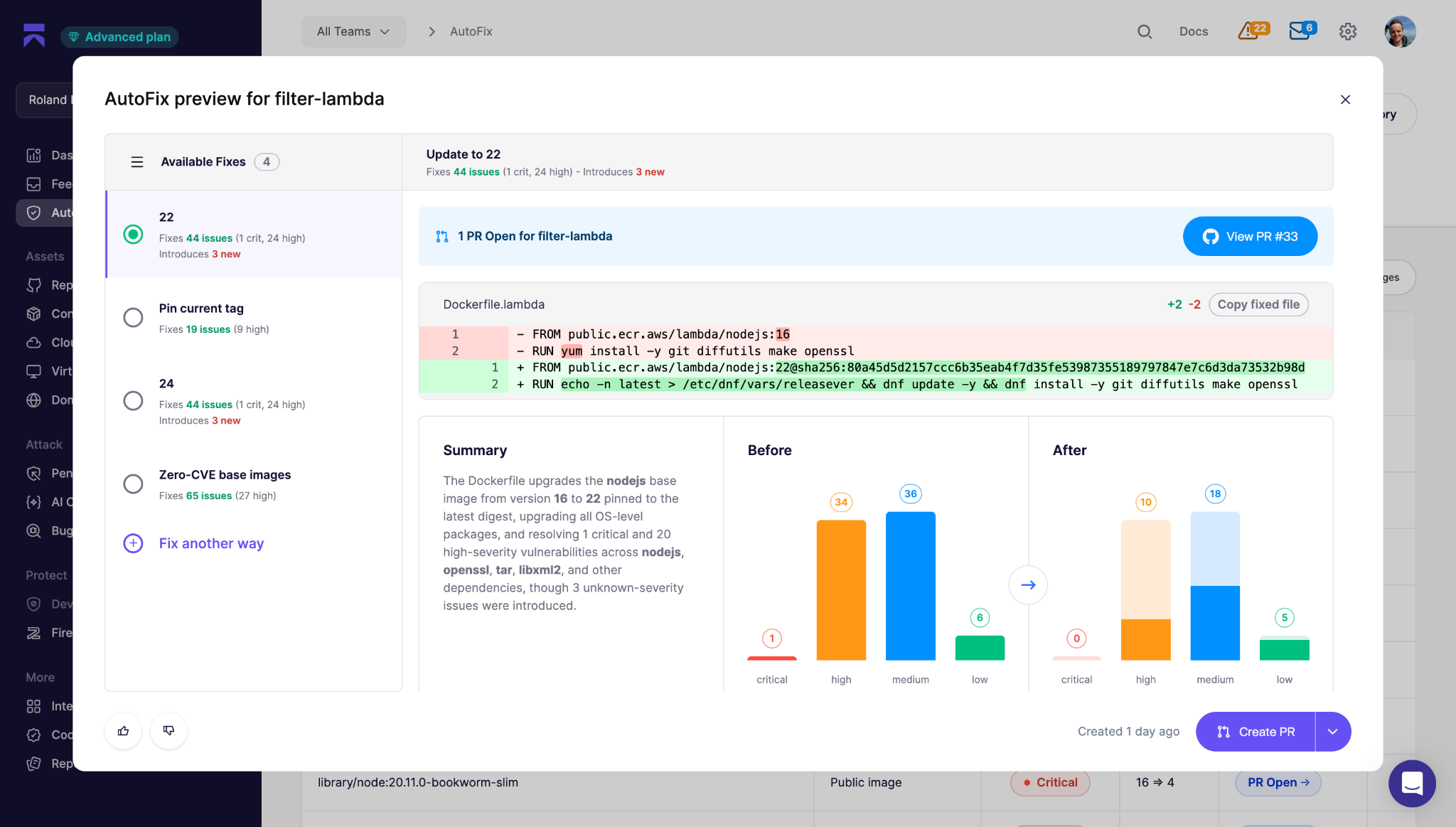
Aikido Images is a registry of 2,000+ drop-in replacement images where the known critical and high-severity vulnerabilities in the base are already patched. Each one is rebuilt, patched, minimized, and hardened during the build, so you get a smaller attack surface and locked-down defaults on the base you already run.
Where a rebuilt-distribution tool ships the patch as a new image you migrate onto, Aikido backports the fix to the version you've pinned. It takes the fix from the newer release and applies it to the version you already run, so the change stays small and the image behaves the way it always has. When a clean backport isn't possible, Aikido upgrades or rebuilds the component instead. The swap is a drop-in that AutoFix proposes as a pull request, and every pull from docker.aikido.io comes with an SBOM, VEX, and SLSA provenance.
It keeps patching versions after upstream has moved on, including bases that have reached end-of-life, so you can hold an older version without carrying its known flaws and you don’t have to upgrade just to stay covered.
A growing share of real fixes to packages never get a CVE at all, so if you or your tools only read the CVE database, you’re missing vulnerabilities. Aikido's patching is fed in part by Aikido Intel, which reads upstream changelogs and commit history to catch vulnerabilities that were quietly patched upstream without one, so coverage isn't limited to what the public databases have gotten around to enriching.
Application-level packages across npm, PyPI, Maven, and Go are patched in place through Aikido Libraries, using the same backporting approach applied to your dependencies. And Aikido Container Image Scanning checks for vulnerable OS packages, dependencies, outdated runtimes, malware, and license risks across base images, Dockerfile commands, and Kubernetes workloads, so a finding shows up with the code and cloud context.
The team behind these images came to Aikido through the acquisition of Root, the company behind SlimToolkit (formerly DockerSlim), one of the most widely used open source image-hardening tools. Image hardening is where this team started, and the tool is still free and open for anyone to use.
{{walkthrough}}
FAQ
<script type="application/ld+json">
{
"@context": "https://schema.org",
"@graph": [
{
"@type": "TechArticle",
"@id": "https://www.aikido.dev/blog/securing-docker-images#article",
"isPartOf": { "@id": "https://www.aikido.dev/blog/securing-docker-images#webpage" },
"mainEntityOfPage": { "@id": "https://www.aikido.dev/blog/securing-docker-images#webpage" },
"headline": "Securing Docker images: harden, patch, and maintain them",
"description": "Most of a container's vulnerabilities come from the base image. How to harden Docker images, why hardening is ongoing, and how to patch the base you already run.",
"datePublished": "2026-08-28",
"dateModified": "2026-08-28",
"wordCount": 1650,
"timeRequired": "PT8M",
"inLanguage": "en-US",
"author": { "@id": "https://www.aikido.dev/authors/nicholas-thomson#person" },
"publisher": { "@id": "https://www.aikido.dev/#organization" },
"image": { "@id": "https://www.aikido.dev/blog/securing-docker-images#primaryimage" },
"articleSection": "DevSec Tools & Comparisons",
"keywords": [
"securing Docker images",
"Docker image security",
"container image hardening",
"base image vulnerabilities",
"distroless images",
"backporting CVE fixes",
"container vulnerability management",
"non-root container",
"multi-stage builds",
"SBOM"
],
"about": [
{ "@type": "Thing", "name": "Docker image security" },
{ "@type": "Thing", "name": "Container image hardening" },
{ "@type": "Thing", "name": "Vulnerability management" }
],
"mentions": [
{ "@type": "SoftwareApplication", "name": "Docker", "applicationCategory": "DeveloperApplication" },
{ "@type": "SoftwareApplication", "name": "Aikido Images", "applicationCategory": "SecurityApplication", "url": "https://www.aikido.dev/cloud/hardened-images" },
{ "@type": "SoftwareApplication", "name": "Aikido Libraries", "applicationCategory": "SecurityApplication" },
{ "@type": "Thing", "name": "Alpine Linux" },
{ "@type": "Thing", "name": "Debian" },
{ "@type": "Thing", "name": "glibc" },
{ "@type": "Thing", "name": "Node.js" },
{ "@type": "Thing", "name": "SBOM" },
{ "@type": "Thing", "name": "SLSA provenance" },
{ "@type": "Thing", "name": "VEX" },
{ "@type": "Thing", "name": "CVE-2023-4911", "url": "https://nvd.nist.gov/vuln/detail/CVE-2023-4911" },
{ "@type": "Thing", "name": "CVE-2025-4373" }
],
"speakable": {
"@type": "SpeakableSpecification",
"cssSelector": ["h1", "h2"]
}
},
{
"@type": "WebPage",
"@id": "https://www.aikido.dev/blog/securing-docker-images#webpage",
"url": "https://www.aikido.dev/blog/securing-docker-images",
"name": "Securing Docker images: harden, patch, and maintain them",
"description": "Most of a container's vulnerabilities come from the base image. How to harden Docker images, why hardening is ongoing, and how to patch the base you already run.",
"inLanguage": "en-US",
"isPartOf": { "@id": "https://www.aikido.dev/#website" },
"primaryImageOfPage": { "@id": "https://www.aikido.dev/blog/securing-docker-images#primaryimage" },
"breadcrumb": { "@id": "https://www.aikido.dev/blog/securing-docker-images#breadcrumb" },
"datePublished": "2026-08-28",
"dateModified": "2026-08-28"
},
{
"@type": "ImageObject",
"@id": "https://www.aikido.dev/blog/securing-docker-images#primaryimage",
"url": "https://www.aikido.dev/blog/securing-docker-images/hero.png",
"caption": "Securing Docker images"
},
{
"@type": "BreadcrumbList",
"@id": "https://www.aikido.dev/blog/securing-docker-images#breadcrumb",
"itemListElement": [
{ "@type": "ListItem", "position": 1, "name": "Home", "item": "https://www.aikido.dev" },
{ "@type": "ListItem", "position": 2, "name": "Blog", "item": "https://www.aikido.dev/blog" },
{ "@type": "ListItem", "position": 3, "name": "Securing Docker images", "item": "https://www.aikido.dev/blog/securing-docker-images" }
]
},
{
"@type": "WebSite",
"@id": "https://www.aikido.dev/#website",
"url": "https://www.aikido.dev",
"name": "Aikido Security",
"publisher": { "@id": "https://www.aikido.dev/#organization" },
"inLanguage": "en-US"
},
{
"@type": "Organization",
"@id": "https://www.aikido.dev/#organization",
"name": "Aikido Security",
"url": "https://www.aikido.dev",
"logo": {
"@type": "ImageObject",
"url": "https://www.aikido.dev/logo.png"
},
"sameAs": [
"https://www.linkedin.com/company/aikido-security",
"https://x.com/AikidoSecurity"
]
},
{
"@type": "Person",
"@id": "https://www.aikido.dev/authors/nicholas-thomson#person",
"name": "Nicholas Thomson",
"url": "https://www.aikido.dev/authors/nicholas-thomson",
"jobTitle": "Senior SEO & Growth Lead",
"worksFor": { "@id": "https://www.aikido.dev/#organization" },
"sameAs": [
"https://www.linkedin.com/in/nicholas-gray-thomson/"
]
},
{
"@type": "FAQPage",
"@id": "https://www.aikido.dev/blog/securing-docker-images#faq",
"isPartOf": { "@id": "https://www.aikido.dev/blog/securing-docker-images#webpage" },
"mainEntity": [
{
"@type": "Question",
"name": "What is the most important step to secure a Docker image?",
"acceptedAnswer": {
"@type": "Answer",
"text": "Choosing a small base image. Most of a container's vulnerabilities come from the OS packages the base ships, not the code you wrote, so a smaller base means fewer inherited flaws before you add anything of your own. A distroless or minimal base drops whole classes of vulnerabilities that a full distro image would drag in."
}
},
{
"@type": "Question",
"name": "Should Docker containers run as root?",
"acceptedAnswer": {
"@type": "Answer",
"text": "No, unless something genuinely requires it. If an attacker gets code execution in your app, they inherit whatever privileges the container runs as, and root in the container plus a container escape can mean root on the host. Set a dedicated non-root user in your Dockerfile and drop the Linux capabilities the app never uses."
}
},
{
"@type": "Question",
"name": "What is the difference between a minimal image and a hardened image?",
"acceptedAnswer": {
"@type": "Answer",
"text": "A minimal image ships less, stripping out shells, package managers, and libraries the app doesn't need. A hardened image starts from a minimal base and goes further, applying patched package versions and secure defaults like non-root execution. Minimal shrinks the attack surface, and hardened shrinks it and locks down what's left."
}
},
{
"@type": "Question",
"name": "Do I have to migrate to a new distro to harden my base image?",
"acceptedAnswer": {
"@type": "Answer",
"text": "No. Some hardening tools rebuild images on their own distribution, which means migrating every service and re-testing for breakage. The alternative is to keep the distro and major version you already run and backport fixes to that exact version, which is how Aikido Images works, so you get the patch without the migration."
}
},
{
"@type": "Question",
"name": "Why does a hardened image become vulnerable again over time?",
"acceptedAnswer": {
"@type": "Answer",
"text": "Because new vulnerabilities are disclosed against packages already inside it. Nothing in the image changed, but the list of known flaws in its packages keeps growing. Hardening is an ongoing job rather than a one-time pass."
}
},
{
"@type": "Question",
"name": "Can a secret end up inside a Docker image by accident?",
"acceptedAnswer": {
"@type": "Answer",
"text": "Yes, and it is a common mistake. A secret pulled in with ARG or COPY stays in the image history even if a later layer deletes it, so anyone who pulls the image can unpack the layers and read it. Use build-time secret mounts during the build, and inject runtime secrets from a secrets manager rather than baking them into the image."
}
}
]
}
]
}
</script>